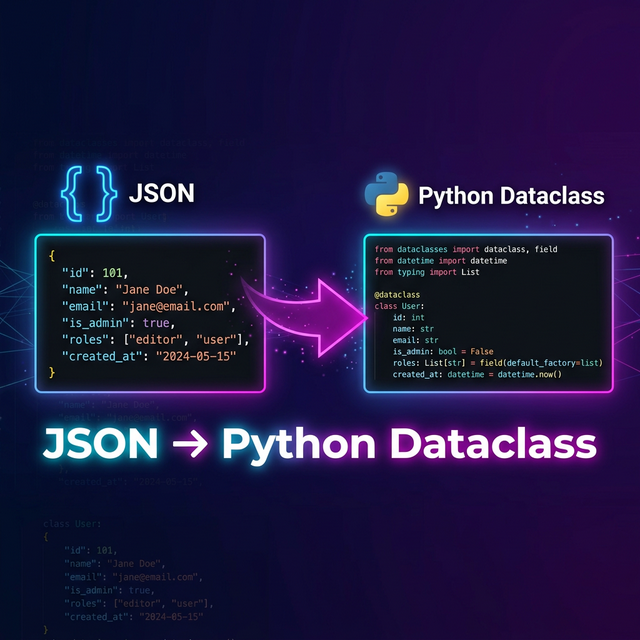
Python's dataclass decorator (introduced in Python 3.7) is one of the cleanest ways to define
structured data in Python. When combined with type hints, dataclasses give you
autocomplete, type checking, and self-documenting code — perfect for working with JSON data from APIs,
databases, or configuration files. In this comprehensive guide, you'll learn how to
convert JSON to Python dataclasses using multiple approaches.
Why Use Dataclasses for JSON Data?
When consuming REST APIs or parsing JSON files in Python, you have several options for representing the data:
- Plain dictionaries — no autocomplete, easy to mistype keys, no type safety
- NamedTuples — immutable but limited, no default values in older Python
- Dataclasses — full type hints, mutable/immutable, default values, comparison support
- Pydantic models — runtime validation, coercion, serialization (more on this below)
Dataclasses offer the best balance of simplicity and type safety for most use cases.
Step 1: Understand Your JSON Structure
Consider this typical API response from a user management system:
{
  "id": 42,
  "username": "devuser",
  "email": "[email protected]",
  "profile": {
    "firstName": "Jane",
    "lastName": "Doe",
    "bio": "Full-stack developer",
    "socialLinks": {
      "github": "https://github.com/janedoe",
      "twitter": null
    }
  },
  "roles": ["admin", "editor"],
  "settings": {
    "theme": "dark",
    "notifications": true,
    "language": "en"
  },
  "createdAt": "2026-01-15T10:30:00Z"
}JSON
This JSON has nested objects (profile, socialLinks,
settings), arrays (roles), nullable fields
(twitter), and mixed types. A proper conversion needs to handle all of these.
Step 2: Define Your Dataclasses
Map each JSON object to a Python dataclass, starting from the innermost nested objects:
from dataclasses import dataclass, field
from typing import Optional
from datetime import datetime

@dataclass
class SocialLinks:
    github: str
    twitter: Optional[str] = None

@dataclass
class Profile:
    first_name: str
    last_name: str
    bio: str
    social_links: SocialLinks

@dataclass
class Settings:
    theme: str = "dark"
    notifications: bool = True
    language: str = "en"

@dataclass
class User:
    id: int
    username: str
    email: str
    profile: Profile
    roles: list[str] = field(default_factory=list)
    settings: Settings = field(default_factory=Settings)
created_at: str = ""PythonJSON uses camelCase (firstName) while Python
uses snake_case (first_name). Libraries like dataclasses_json
and dacite handle this mapping automatically. Polymorpher's converter also applies
proper Python naming conventions.
Step 3: Parse JSON into Dataclass Instances
There are several popular libraries for converting JSON dictionaries to dataclass instances:
Approach 1: dacite (Simplest)
dacite is a lightweight library that converts dictionaries to dataclasses with minimal setup:
import json
import dacite

json_string = '{"id": 42, "username": "devuser", ...}'
data = json.loads(json_string)

user = dacite.from_dict(
    data_class=User,
    data=data,
    config=dacite.Config(
        type_hooks={datetime: datetime.fromisoformat}
    )
)

print(user.profile.social_links.github)
# "https://github.com/janedoe"Python
Approach 2: dataclasses-json (Feature-Rich)
Provides both serialization and deserialization with naming convention support:
from dataclasses_json import dataclass_json, LetterCase

@dataclass_json(letter_case=LetterCase.CAMEL)
@dataclass
class SocialLinks:
    github: str
    twitter: Optional[str] = None

@dataclass_json(letter_case=LetterCase.CAMEL)
@dataclass
class User:
    id: int
    username: str
    email: str
    profile: Profile
    roles: list[str] = field(default_factory=list)

# Direct from JSON string
user = User.from_json(json_string)

# Back to JSON
json_output = user.to_json(indent=2)Python
Approach 3: Pydantic (Production-Grade)
For production applications, Pydantic v2 is the gold standard — it provides runtime validation, automatic type coercion, and excellent performance:
from pydantic import BaseModel, Field
from typing import Optional
from datetime import datetime

class SocialLinks(BaseModel):
    github: str
    twitter: Optional[str] = None

class Profile(BaseModel):
    first_name: str = Field(alias="firstName")
    last_name: str = Field(alias="lastName")
    bio: str
    social_links: SocialLinks = Field(alias="socialLinks")

class Settings(BaseModel):
    theme: str = "dark"
    notifications: bool = True
    language: str = "en"

class User(BaseModel):
    id: int
    username: str
    email: str
    profile: Profile
    roles: list[str] = []
    settings: Settings = Settings()
    created_at: datetime = Field(alias="createdAt")

    model_config = {"populate_by_name": True}

# Validates data at runtime — raises clear errors for invalid data
user = User.model_validate_json(json_string)

print(user.created_at)
# datetime(2026, 1, 15, 10, 30, tzinfo=timezone.utc)Pythondacite for simple scripts and prototyping. dataclasses-json for bidirectional serialization. Pydantic for production APIs with FastAPI, Django, or Flask. Pydantic is the most popular choice for web applications and is required by FastAPI.
Handling Complex Patterns
Lists of Nested Objects
# JSON: {"orders": [{"id": 1, "total": 29.99}, ...]}
@dataclass
class Order:
    id: int
    total: float

@dataclass
class OrderResponse:
    orders: list[Order] = field(default_factory=list)Python
Union Types (Python 3.10+)
@dataclass
class ApiResponse:
    data: dict | list | None = None
    error: str | None = None
    status_code: int = 200Python
Enum Fields
from enum import Enum

class Role(Enum):
    ADMIN = "admin"
    EDITOR = "editor"
    VIEWER = "viewer"

@dataclass
class User:
    username: str
    role: Role  # dacite handles enum conversion automaticallyPython
Use Polymorpher for Instant Conversion
Instead of writing dataclasses manually, use Polymorpher's JSON to Code Classes Converter to generate them instantly. Select Python as the target language and get production-ready dataclass definitions with proper type hints, nested classes, and snake_case naming.
Try JSON to Python Converter
Paste your JSON and get instant Python dataclasses. Supports 10 languages. Free, no sign-up.
Open Converter →Conclusion
Converting JSON to Python dataclasses is essential for any Python developer working with APIs. Dataclasses give you type safety, IDE support, and clean code. Use dacite for simplicity, dataclasses-json for bidirectional serialization, or Pydantic for production-grade validation with FastAPI.
Use Polymorpher's free converter to skip the manual work and generate perfectly typed Python dataclasses in seconds. Also check out our JSON to C# guide for .NET developers, and the Code Beautifier to format your JSON before converting.