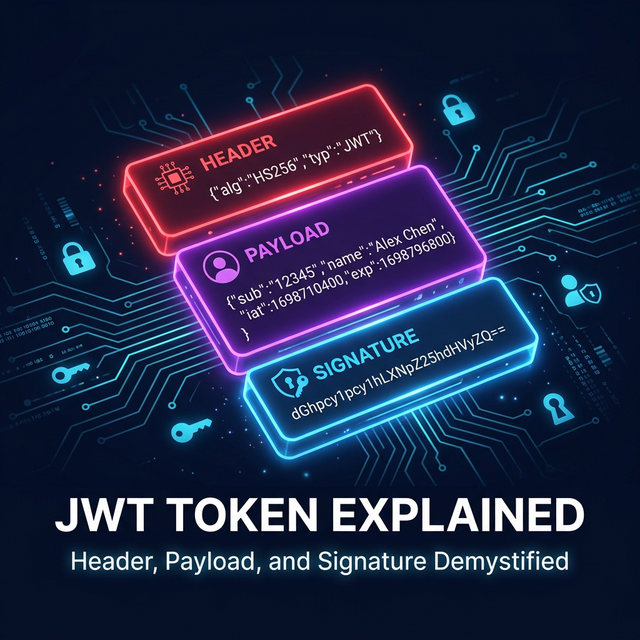
JSON Web Tokens (JWT) have become the standard for authentication in modern web APIs. Whether you're building a microservices architecture, a single-page application, or a mobile app backend, you'll almost certainly encounter JWTs. This guide explains what JWT tokens are, how they work, and how to decode and debug them effectively.
What is a JWT Token?
A JSON Web Token is a compact, URL-safe string that represents claims (pieces of
information) between two parties. It's commonly used as a bearer token in the
Authorization header of HTTP requests:
Authorization: Bearer eyJhbGciOiJIUzI1NiIsInR5cCI6IkpXVCJ9.
eyJzdWIiOiIxMjM0NTY3ODkwIiwibmFtZSI6IkpvaG4gRG9lIi
wiYWRtaW4iOnRydWUsImlhdCI6MTUxNjIzOTAyMn0.
POstGetfAytaZS82wHcjoTyoqhMyxXiWdR7Nn7A29DNSl0EiXLdwHTTP
JWT Structure: Three Parts
A JWT consists of three Base64URL-encoded parts separated by dots (.):
1. Header
The header identifies the signing algorithm and token type:
{
  "alg": "HS256",
  "typ": "JWT"
}JSON — Header
Common algorithms: HS256 (HMAC + SHA256), RS256 (RSA + SHA256), ES256
(ECDSA + SHA256).
2. Payload (Claims)
The payload contains the claims — statements about the user and metadata:
{
  "sub": "user_12345",
  "name": "Jane Doe",
  "email": "[email protected]",
  "role": "admin",
  "iat": 1772920800,
  "exp": 1772924400,
  "iss": "https://auth.example.com"
}JSON — Payload
Standard (registered) claims:
| Claim | Name | Description |
|---|---|---|
sub |
Subject | Unique identifier for the user |
iss |
Issuer | Who issued the token (auth server URL) |
aud |
Audience | Intended recipient (API URL) |
exp |
Expiration | Unix timestamp when token expires |
iat |
Issued At | Unix timestamp when token was created |
nbf |
Not Before | Token is not valid before this time |
jti |
JWT ID | Unique identifier for the token itself |
3. Signature
The signature verifies that the token hasn't been tampered with. It's created by signing the encoded header and payload with a secret key:
HMACSHA256(
  base64UrlEncode(header) + "." + base64UrlEncode(payload),
  secret_key
)PseudocodeThe payload is only Base64-encoded, not encrypted. Anyone with the token can read its contents. Never put sensitive data (passwords, credit card numbers) in the payload. Use JWE (JSON Web Encryption) if you need encrypted tokens.
How JWT Authentication Works
- User logs in with credentials (username/password, OAuth2 provider, etc.)
- Auth server validates credentials and generates a JWT signed with a secret key
- Client stores the JWT (localStorage, sessionStorage, or HttpOnly cookie)
- Client sends JWT in the
Authorization: Bearer <token>header with each API request - API server validates the signature, checks expiration, and extracts claims to authorize the request
Unlike session-based auth, the server doesn't need to store session data. All user information is embedded in the token itself, making JWT ideal for microservices and distributed systems.
Decoding a JWT Token
To inspect a JWT's contents, you need to Base64URL-decode the header and payload parts. Here's how to do it programmatically:
C# — Decode Without Validation
var token = "eyJhbGciOiJIUzI1NiIs...";
var parts = token.Split('.');

string header = Encoding.UTF8.GetString(
    Convert.FromBase64String(
        parts[0].PadRight(parts[0].Length +
            (4 - parts[0].Length % 4) % 4, '=')
    )
);

string payload = Encoding.UTF8.GetString(
    Convert.FromBase64String(
        parts[1].PadRight(parts[1].Length +
            (4 - parts[1].Length % 4) % 4, '=')
    )
);

Console.WriteLine($"Header:  {header}");
Console.WriteLine($"Payload: {payload}");C#
JavaScript — Quick Decode
function decodeJwt(token) {
    const [header, payload] = token
        .split('.')
        .slice(0, 2)
        .map(part => JSON.parse(atob(
            part.replace(/-/g, '+').replace(/_/g, '/')
        )));

    return { header, payload };
}

const { header, payload } = decodeJwt(token);
console.log('Expires:', new Date(payload.exp * 1000));JavaScript
Common JWT Debugging Issues
- Token expired — check the
expclaim against current time. Use our DateTime Converter to convert Unix timestamps. - Invalid signature — the token was signed with a different key than the one used for verification
- Wrong audience — the
audclaim doesn't match the expected API URL - Clock skew — server clocks are slightly out of sync. Most libraries allow a small tolerance (e.g., 5 minutes)
Try JWT Decoder
Paste any JWT token to instantly inspect header, payload, claims, and expiration. No signing secret required.
Open JWT Decoder →Security Best Practices
- Short expiration times — use 15-60 minute lifetimes with refresh token rotation
- Use RS256 for public APIs — asymmetric signing lets clients verify without knowing the secret
- Store in HttpOnly cookies — prevents XSS attacks from stealing tokens via JavaScript
- Validate all claims — always check
exp,iss,audon the server side - Rotate signing keys — use JWKS (JSON Web Key Set) for key rotation in production
Conclusion
JWT tokens are powerful but require careful implementation. Understanding the three-part structure, standard claims, and security implications is essential for any developer working with APIs and authentication systems.
Use Polymorpher's free JWT Decoder to quickly debug tokens during development. Combine it with the Base64 Encoder to understand the encoding layer, and the Hash Generator to experiment with the signature algorithm.